

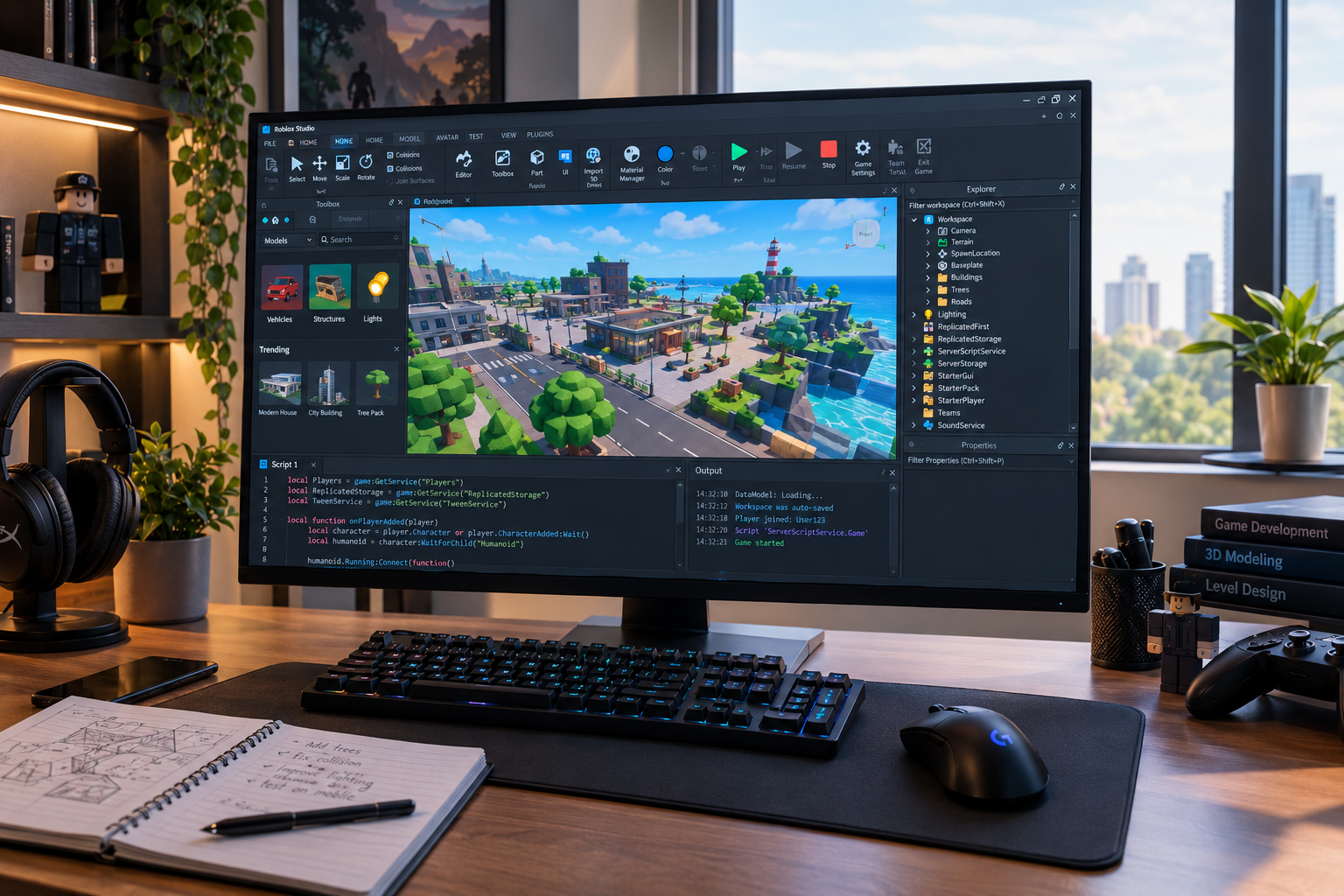
Roblox Studio is the main development environment for creating experiences on Roblox. It brings together 3D building tools, scripting, testing, asset management, collaboration features, and publishing in one application. Best of all, Roblox provides Studio as a free application for Windows and Mac.
For someone completely new to game development, the interface can initially seem complicated. There are windows for the 3D workspace, Explorer, Properties, scripts, output, and testing. Once the basic workflow becomes familiar, however, Roblox Studio provides a practical way to move from an idea to a playable experience.
What Is Roblox Studio?
Roblox Studio is an integrated development environment designed specifically for creating content on Roblox. Developers can use it to construct 3D environments, create gameplay mechanics, add visual effects, write scripts, test multiplayer behaviour, and publish finished projects.
A project can begin with a blank baseplate or one of several templates. Roblox currently provides templates such as Platformer and Racing, which give beginners working examples they can modify rather than forcing them to start entirely from scratch.
This makes the software useful for both beginners learning game development and experienced creators building larger projects.
Getting Started With Roblox Studio
The first step is installing Studio on a supported computer. Roblox currently lists Windows 10 and macOS 10.14 as minimum operating-system requirements, with Windows 11 and macOS 14 or later among its recommended configurations. The recommended memory requirement is 8 GB of RAM.
After installation, sign in with a Roblox account and open a new project. Beginners can start with a template before experimenting with individual parts and settings.
The interface is built around several important areas:
- 3D viewport: The main area where environments are created and edited.
- Explorer: Shows the hierarchy of objects within the project.
- Properties: Allows individual objects and services to be configured.
- Script Editor: Used to create and edit gameplay code.
- Output: Helps identify messages, warnings, and script errors.
- Testing controls: Allow creators to run and inspect their experience before release.
Learning what each window does is more useful than trying to memorize every feature at once.
Building a 3D World
One of the most accessible parts of Roblox Studio is environment creation. Basic objects can be positioned, rotated, resized, textured, and combined to create buildings, platforms, roads, obstacles, interiors, and other game environments.
The platform also supports terrain, lighting, physical constraints, sound, meshes, and other components. Creators can use built-in primitives or work with additional assets from the Creator Store.
A good beginner project might be a simple obstacle course. It can teach useful fundamentals such as spawning players, arranging platforms, adding checkpoints, creating hazards, and testing movement without requiring a huge game world.
Using Assets Carefully
The Creator Store provides access to a large collection of models, meshes, images, sounds, videos, and plugins. These resources can speed up development, but creators should still understand what they are adding to a project and how those assets behave.
Reusable packages can also help organize assets that need to be maintained across projects.
Scripting and Luau
Building the environment is only part of game development. To make objects respond to players and create gameplay systems, developers use scripting.
Roblox scripting uses Luau, a programming language derived from Lua 5.1. Scripts can handle player input, events, leaderboards, enemy behaviour, saved data, interactive objects, and many other game systems.
A beginner does not need to learn every programming concept immediately. Variables, functions, conditionals, loops, tables, and events provide a strong foundation.
For example, a simple game could use a script to detect when a player touches an object and then award points. More advanced projects can build upon the same basic concepts to create inventories, shops, quests, multiplayer systems, and progression mechanics.
💡 Pro Tip: Keep your first scripts small. Test one mechanic at a time, read the Output window when something fails, and avoid building an entire game system before you know that its individual parts work.
Testing Your Game Before Publishing
Testing is one of the most important parts of the Roblox Studio workflow. A game can look correct in the editor but behave differently when players interact with it.
Studio includes several testing options. The standard Test mode launches a simulation with a player, while Run starts the simulation without inserting an avatar. Creators can also use Server & Clients testing to simulate multiplayer sessions.
Device simulation is particularly useful because experiences may be played on different screen sizes and input methods. Network simulation can also reproduce conditions such as latency, jitter, and packet loss.
| Studio feature | Main purpose | Useful for |
|---|---|---|
| 3D Workspace | Build environments | Maps and level design |
| Script Editor | Create gameplay logic | Mechanics and systems |
| Playtest | Run the experience | Finding gameplay problems |
| Device Simulator | Preview different devices | Mobile and cross-device testing |
| Server & Clients | Simulate multiplayer | Multiplayer debugging |
| Creator Store | Find reusable assets | Faster development |
Testing should happen throughout development rather than only immediately before publication.
Publishing a Roblox Experience
When a project is ready, Roblox Studio can publish it to the Roblox platform. A new project starts with a place, which contains the objects, environment, lighting, and scripts that make up that part of the experience. Larger games can contain multiple places for different areas or gameplay sections.
Newly published games are private by default. Creators can continue testing and updating the project before making it publicly accessible, subject to Roblox’s current publishing requirements.
Publishing should therefore be treated as part of an ongoing development process rather than the final step that ends development.
Learning Roblox Studio More Efficiently
The fastest way to improve is usually to build small projects instead of attempting a massive game immediately.
Start with something manageable, such as an obstacle course, simple racing game, or basic survival project. Once the fundamentals make sense, introduce more advanced systems one at a time.
Roblox’s official learning resources cover subjects including environment design, gameplay scripting, UI design, and other development areas.
You can also explore related technology topics such as virtual reality experiences to understand how interactive digital environments are being used beyond conventional games.
📌 Key Takeaway: Roblox Studio works best when you treat game creation as an iterative process: build a small feature, script it, test it, fix problems, and then expand. Learning this workflow is more valuable than trying to master every tool at once.
Frequently Asked Questions
Is Roblox Studio free?
Yes. Roblox provides Studio as a free application for Windows and Mac. It includes tools for building, scripting, testing, and publishing Roblox experiences.
Can beginners use Roblox Studio?
Yes. Roblox provides beginner-focused tutorials and templates designed to introduce new creators to the interface and basic development concepts. Starting with a small project can make the learning process easier.
What programming language does Roblox Studio use?
Roblox Studio uses Luau, a programming language derived from Lua 5.1. It is used to create interactive gameplay systems and dynamic behaviour within experiences.
Can you make multiplayer games with Roblox Studio?
Yes. Roblox Studio includes multiplayer testing tools that allow creators to simulate server and client sessions before releasing an experience. This can help identify problems that may not appear during single-player testing.
Can you publish games directly from Roblox Studio?
Yes. Creators can publish experiences directly through Studio. Projects can remain private while development and testing continue, then be made available publicly when the creator is ready and the applicable publishing requirements are met.
Conclusion
Roblox Studio gives creators a complete environment for turning game ideas into interactive experiences. Its building tools handle the visual world, Luau provides gameplay logic, testing features help identify problems, and publishing connects completed projects with Roblox players.
For beginners, the most effective approach is to start small and gradually introduce more complex mechanics. With regular practice, the same workflow can support everything from a basic obstacle course to a much larger multiplayer experience.

2 Comments
Pingback: Brittany Mahomes: Essential Facts About Her Life & Career
Pingback: Instructions for LCFGamestick: How to Set It Up Easily