

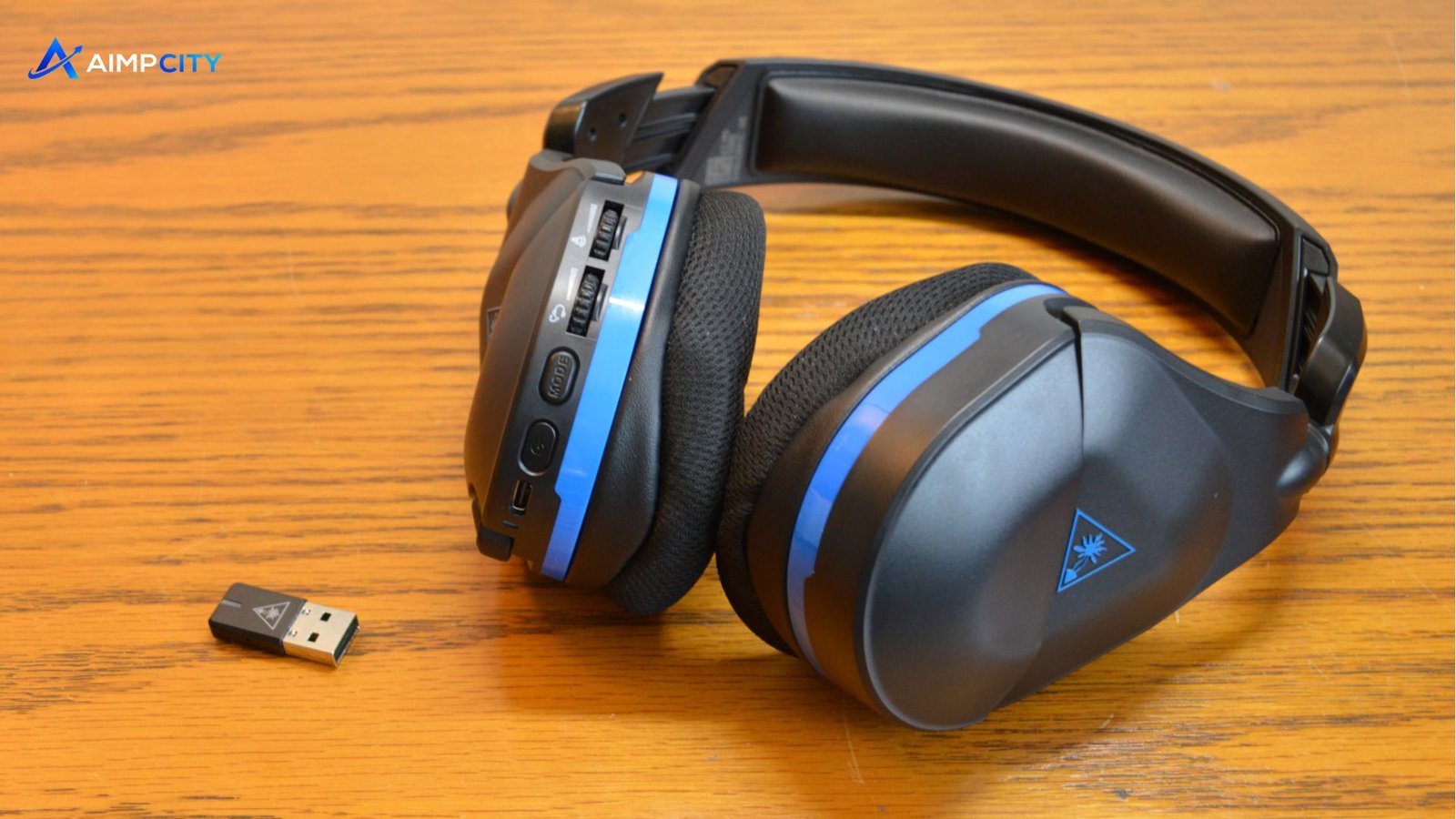
If you have ever played an online match with a headset that sounded fine for five minutes and then became uncomfortable, loose, or frustrating to control, you know that gaming headsets are about more than audio quality. The Stealth 600 Gen 2 was designed to address several of those everyday problems with wireless connectivity, virtual surround sound, a flip-to-mute microphone, and a lightweight design.
But there is a bigger question today: does the Turtle Beach Stealth 600 Gen 2 still make sense, particularly when newer gaming headsets are available?
The answer depends heavily on how and where you play. Someone who mainly plays console games from the sofa has different priorities from a competitive FPS player who needs precise positional audio. Battery expectations, microphone performance, comfort, platform compatibility, and wireless reliability can all change the buying decision.
This guide looks beyond the specification sheet. It explains what the headset is actually suited for, where it can disappoint, which settings matter most, and the small details that can make a noticeable difference during everyday gaming.
What Is the Turtle Beach Stealth 600 Gen 2?
The Turtle Beach Stealth 600 Gen 2 is a wireless gaming headset aimed primarily at console players, with versions designed for different platforms. It builds on the original Stealth 600 by refining comfort, controls, microphone positioning, wireless performance, and overall usability.
Its core appeal is simple: you get a wireless headset without moving into the highest price category.
Key features include:
- Wireless gaming connectivity
- Flip-to-mute microphone
- Superhuman Hearing mode
- Preset EQ options
- Mic monitoring
- Surround sound support on compatible platforms
- Memory foam cushions
- Adjustable headband
- Physical controls on the earcup
- USB-C charging on the Gen 2 model
The important point is that these features are intended to solve practical gaming problems rather than simply make the specification sheet look impressive.
How Does the Stealth 600 Gen 2 Sound?
The sound signature is one of the headset’s strongest areas for general gaming.
Out of the box, the audio has enough bass to make explosions, engines, and action-heavy scenes feel satisfying. At the same time, dialogue and many gameplay details remain easy to hear.
For competitive games, however, the default tuning is not necessarily the best choice.
A better approach is to experiment with the available EQ presets. Reducing excessive low-end emphasis can sometimes make footsteps, reload sounds, distant movement, and other positional cues easier to distinguish.
Superhuman Hearing: Useful or Overhyped?
Superhuman Hearing is particularly interesting.
It changes the audio emphasis to make certain subtle sounds easier to notice. In a competitive shooter, that can help you pick up footsteps or movement that might otherwise be masked by louder effects.
But there is a trade-off.
It can make the overall sound less enjoyable for normal gaming because you’re deliberately prioritizing specific frequencies rather than listening to the game’s full mix.
A practical approach is:
- Use the normal EQ profile for story games and casual play.
- Try Superhuman Hearing during competitive matches.
- Turn it off when music, dialogue, or cinematic sound matters more.
- Give your ears a few minutes to adjust before deciding whether the setting helps.
This is one of those features that works best as a situational tool rather than a permanent setting.
Comfort During Long Gaming Sessions
A headset can have excellent audio and still be a poor purchase if it becomes uncomfortable after an hour.
The Stealth 600 Gen 2 uses memory foam-style ear cushions and a relatively lightweight construction. The adjustable headband also helps accommodate different head sizes.
For many users, the main advantage is that the headset does not feel excessively heavy.
However, comfort is highly individual.
If you wear glasses, for example, the pressure created where the headset cushions meet the frame can become more noticeable during long sessions. Likewise, users with larger ears may find that the earcups do not provide the same spacious feeling as larger premium headsets.
A Small Comfort Adjustment That Helps
Don’t automatically wear the headset with the earcups positioned exactly where they first land.
Spend a minute adjusting the headband height and earcup position. A slightly different angle can reduce pressure around the temples and improve the seal around your ears.
That seal matters because it affects both comfort and perceived bass.
Microphone Performance: Good Enough for Team Chat?
The flip-to-mute microphone is one of the headset’s most convenient features.
When the microphone is raised, it automatically mutes. Lower it and you can start communicating again.
That sounds simple, but it is genuinely useful during gaming because you don’t need to reach for a button every time you want privacy.
Voice quality is generally appropriate for party chat and multiplayer communication. However, users expecting studio-quality recording should keep their expectations realistic.
The microphone is built for communication, not podcast production.
One Mistake That Can Make the Mic Sound Worse
Microphone positioning matters more than many people realize.
If the microphone is too far from your mouth, your voice can sound quieter and thinner. If it is positioned directly against your face, breathing and handling noise may become more noticeable.
Positioning the boom slightly to the side and close enough to capture your voice clearly usually produces a better result.
Wireless Performance and Everyday Reliability
Wireless freedom is arguably the main reason to choose the Stealth 600 Gen 2 instead of a conventional wired headset.
There is no cable running from the controller to the sofa, and you can move around without worrying about accidentally pulling a cable.
For normal gaming distances, wireless performance is generally convenient. But wireless headsets are still dependent on their connection environment.
Walls, distance, nearby wireless devices, and interference can influence reliability.
If you experience occasional audio interruptions, don’t immediately assume the headset is defective. First try moving closer to the console or connected device and reducing potential sources of interference.
Battery Life: What Should You Expect?
Battery performance is another area where expectations matter.
A headset’s advertised battery figure represents an ideal or controlled condition. Real gaming sessions can produce different results depending on volume, microphone use, wireless conditions, and other factors.
A useful habit is to charge the headset after a long gaming session rather than waiting until the battery is almost empty.
This becomes especially important if you regularly use the headset for multiplayer sessions. Running out of battery in the middle of a match is considerably more annoying than remembering to charge it beforehand.
USB-C charging also makes the Gen 2 more convenient than older accessories that rely on less common charging connections.
Stealth 600 Gen 2 vs. Wired Gaming Headsets
The biggest question is not always which headset has better sound. It is which compromises you prefer.
| Feature | Stealth 600 Gen 2 | Typical Wired Headset |
|---|---|---|
| Cable freedom | Excellent | Limited |
| Setup convenience | High | Very high |
| Battery management | Required | Not required |
| Movement | Excellent | Restricted by cable |
| Competitive audio | Good | Depends on model |
| Voice chat | Good | Depends on model |
| Long-term simplicity | Good | Excellent |
A wired headset is attractive if you never want to think about charging.
The Stealth 600 Gen 2 makes more sense if cable-free gaming is important enough to justify occasionally monitoring the battery.
Who Should Buy the Stealth 600 Gen 2?
The headset is particularly well suited to gamers who:
- Prefer wireless gaming
- Play primarily on compatible consoles
- Want physical controls rather than complicated software
- Frequently use party chat
- Want a lightweight headset
- Play a mixture of competitive and casual games
- Don’t want to spend premium-headset money
It can also be a sensible choice for someone upgrading from a basic wired headset and wanting a more convenient setup.
Who Should Consider Something Else?
It may not be the best option if your priorities are very specific.
Consider another headset if you:
- Need exceptional microphone recording quality
- Want audiophile-level music performance
- Need extremely spacious earcups
- Prefer a headset with no battery at all
- Require broad compatibility across many platforms
- Want premium materials and luxury-level construction
The Stealth 600 Gen 2 is designed around practicality. It is not trying to compete with every premium headset in every category.
Three Less-Obvious Insights About the Stealth 600 Gen 2
1. EQ changes can matter more than volume
Many users increase the volume when they cannot hear footsteps or dialogue clearly.
That is not always the solution.
If bass-heavy effects are masking quieter sounds, changing the EQ profile can improve clarity without making the entire headset louder. This is particularly useful for competitive games.
2. Wireless convenience changes how you use the headset
The value of a wireless headset is not limited to eliminating a cable.
Without a cable connected to your controller, it becomes easier to stand up, grab something, move around the room, or adjust your seating position without accidentally pulling the headset or console connection.
That convenience becomes more noticeable over weeks of use than it does during a five-minute test.
3. The microphone’s flip-to-mute design is surprisingly practical
Automatic muting when the microphone is raised seems like a minor feature.
In real multiplayer sessions, though, it eliminates a small but repetitive annoyance. You can mute yourself almost instinctively without searching for a button, which is particularly useful when switching between conversation and gameplay.
Common Stealth 600 Gen 2 Problems and Fixes
Even a good headset can behave strangely from time to time.
Audio suddenly stops working
Try these steps:
- Check the headset’s battery.
- Restart the console or connected device.
- Reconnect the wireless transmitter or connection.
- Check the selected audio output.
- Move closer to the console.
- Install available headset firmware updates.
Microphone isn’t working
First check whether the microphone is raised.
Because the headset uses a flip-to-mute mechanism, the physical position of the microphone directly affects whether your voice is transmitted.
Then check the console’s chat settings and microphone input level.
Audio sounds too bass-heavy
Try another EQ preset or disable features designed to emphasize particular sounds.
Also check the game’s own audio settings. Some games provide separate sliders for dialogue, effects, music, and voice chat.
The headset feels uncomfortable
Adjust the headband before assuming the headset itself is the problem.
Try slightly changing the earcup position and take short breaks during long gaming sessions. If you wear glasses, repositioning the headset can reduce pressure around the frames.
Tips to Get More From the Stealth 600 Gen 2
For the best everyday experience:
- Keep the firmware updated. Updates can address compatibility and performance problems.
- Use different EQ profiles for different games. A cinematic game and a competitive shooter do not necessarily benefit from the same tuning.
- Don’t leave Superhuman Hearing enabled constantly. Use it when its specific emphasis is useful.
- Charge before long multiplayer sessions. It prevents avoidable interruptions.
- Position the microphone carefully. Small adjustments can improve voice clarity.
- Keep wireless distance reasonable. The fewer obstacles between the headset and its connection source, the better.
- Clean the ear cushions regularly. Headset cushions collect skin oils and sweat over time, particularly during summer gaming sessions.
Is the Stealth 600 Gen 2 Still Worth It?
The answer depends on what you want from a gaming headset.
If your priority is a
comfortable wireless gaming experience with useful controls, solid game audio, a practical microphone, and console-focused features,
the Stealth 600 Gen 2 remains an appealing option.
Its biggest strengths are convenience and versatility rather than luxury.
It is not the headset to buy simply because you want the absolute best microphone, the most detailed music reproduction, or the most premium materials. But for everyday multiplayer gaming, casual sessions, and competitive titles where positional awareness matters, it covers the fundamentals well.
The smartest way to evaluate it is to focus on your actual gaming habits. If you value wireless freedom and frequently use voice chat, its strengths become much easier to appreciate.
Frequently Asked Questions
Is the Turtle Beach Stealth 600 Gen 2 good for FPS games?
Yes, it can work well for FPS gaming, particularly when you use an EQ setting that improves positional clarity. Superhuman Hearing can also help emphasize certain sounds such as footsteps. However, competitive players should experiment with settings rather than assuming one preset is ideal for every game.
How long does the Stealth 600 Gen 2 battery last?
Battery performance varies according to usage, volume, microphone activity, and wireless conditions. The advertised figure should be treated as a benchmark rather than a guarantee for every gaming session. Keeping the headset charged between longer sessions is the easiest way to avoid interruptions.
Does the Stealth 600 Gen 2 have a good microphone?
The microphone is well suited to gaming chat and multiplayer communication. Its flip-to-mute design is particularly convenient because raising the microphone automatically mutes it. It is not intended to replace a dedicated USB microphone for professional-quality recording.
Can you use the Stealth 600 Gen 2 for music?
Yes, you can use it for music, but its tuning is primarily designed around gaming. Bass-heavy tracks can sound enjoyable, while listeners seeking highly accurate or neutral music reproduction may prefer a dedicated audio headset or headphones.
Why is my Stealth 600 Gen 2 not connecting?
Start by checking the battery and wireless connection, then restart the connected device and reconnect the headset. Also verify that the correct audio output is selected. If the problem continues, checking firmware and platform-specific compatibility is a sensible next step.
Is the Stealth 600 Gen 2 comfortable for long gaming sessions?
Its lightweight design and padded earcups make it comfortable for many players, but comfort depends on head shape, ear size, glasses, and personal preference. Adjusting the headband and earcup position can make a significant difference. If you regularly game for several hours, short breaks are still worthwhile regardless of the headset.
Final Verdict
The Stealth 600 Gen 2 succeeds because it focuses on the things gamers actually interact with: wireless freedom, straightforward controls, comfortable wear, usable voice chat, and sound profiles that can be adapted to different games.
Its limitations become clearer when you expect premium audio, professional microphone quality, or universal platform flexibility.
