

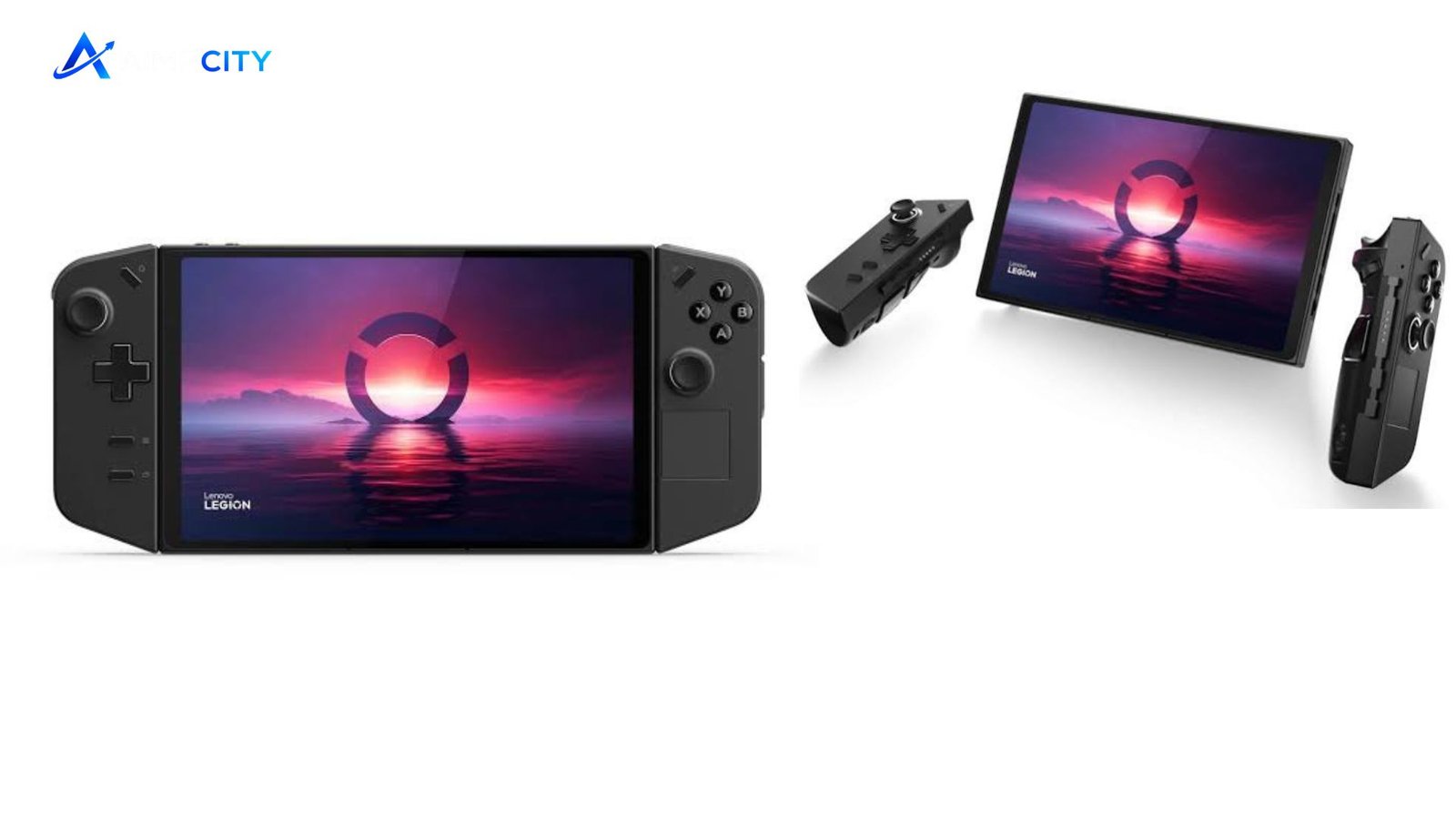
The Lenovo Legion Go is a Windows-based handheld gaming PC built for players who want more flexibility than a traditional console. Its standout features include an 8.8-inch 2560×1600 touchscreen, AMD Ryzen Z1 Extreme processor, detachable controllers, and a built-in FPS mode.
That combination makes it particularly interesting for PC gamers who want access to their existing libraries while still having a console-style portable experience. However, its large size, Windows interface, and battery limitations are worth considering before buying.
What Makes Lenovo Legion Go Different?
The biggest selling point is the display. The device uses an 8.8-inch IPS panel with a 2560×1600 resolution, 144Hz refresh rate, 500-nit brightness, 10-point touch support, and 97% DCI-P3 coverage. That is a notably spacious screen for a handheld gaming PC.
The hardware is based on AMD’s Ryzen Z1 Extreme, an 8-core, 16-thread chip with integrated Radeon graphics. Lenovo pairs it with 16GB of soldered LPDDR5X-7500 memory. Storage configurations can reach 1TB, while the microSD card reader provides another convenient way to expand a game library.
The controllers are another major differentiator. They can be detached from the main unit, allowing the screen to stand independently. One controller can also be used with the built-in mouse sensor in FPS mode, giving the device a more PC-oriented control option.
Lenovo Legion Go Specifications at a Glance
| Feature | Lenovo Legion Go |
|---|---|
| Processor | AMD Ryzen Z1 Extreme, 8 cores / 16 threads |
| Graphics | Integrated AMD Radeon graphics |
| Memory | 16GB LPDDR5X-7500 |
| Display | 8.8-inch IPS, 2560×1600, up to 144Hz |
| Storage | Up to 1TB PCIe 4.0 NVMe SSD |
| Battery | 49.2Wh |
| Operating system | Windows 11 Home |
| Connectivity | Wi-Fi 6E, Bluetooth, dual USB-C 4 |
| Weight | Up to 854g with controllers |
Specifications can vary by regional configuration, so buyers should verify the exact model before ordering. Lenovo’s official specifications list two USB4 ports, a 3.5mm audio jack, microSD support, Wi-Fi 6E, and Bluetooth connectivity.
Gaming Performance and Display
The Ryzen Z1 Extreme gives Lenovo Legion Go enough processing capability for demanding PC games, but performance depends heavily on resolution, graphics settings, power mode, and the individual game.
The 1600p display looks sharp, but native resolution is not always the most practical target for demanding titles. Lowering the resolution can reduce the graphics workload and make better use of the integrated Radeon GPU. Lenovo itself promotes flexible resolution settings ranging from 800p to 1600p.
The 144Hz refresh rate is useful for lighter games and competitive titles, while slower-paced games may benefit more from higher image quality. The touchscreen also makes navigating Windows and game launchers easier than relying entirely on physical controls.
💡 Pro Tip: If a demanding game struggles at 1600p, try 800p or 1200p before aggressively lowering graphical settings. On an 8.8-inch display, a sensible resolution and balanced settings can produce a better overall experience than chasing maximum image quality.
Detachable Controllers Add Real Flexibility
The detachable TrueStrike controllers help the Legion Go feel different from conventional handheld PCs. You can remove them when using the device with another controller, place the screen on its kickstand, or use the FPS mode for games that benefit from mouse-style aiming.
There is a trade-off: portability does not mean lightweight construction. Lenovo lists the base unit at about 640g and the complete system with controllers at about 854g. That makes it substantially larger and heavier than many conventional handheld gaming devices.
For long sessions, that weight can influence comfort as much as raw performance does.
Battery Life and Charging
The Legion Go uses a 49.2Wh battery and supports Super Rapid Charge. Lenovo states that the battery can reach about 70% capacity in 30 minutes under its specified charging conditions.
Actual gaming endurance is more complicated. High brightness, high refresh rates, demanding games, wireless connectivity, and higher performance modes can all increase power consumption. Lenovo’s published battery figures are also based on controlled testing rather than continuous high-performance gaming.
That means buyers should treat the Legion Go as a portable PC that may benefit from regular access to a charger, rather than expecting desktop-class gaming performance for an entire day away from an outlet.
Is Lenovo Legion Go Good for PC Gaming?
For users already invested in PC gaming, the biggest advantage is Windows 11. You are not restricted to one console storefront, and you can use common PC game launchers, accessories, browsers, and productivity software.
That flexibility also introduces more complexity. Windows was designed primarily for larger screens and traditional input devices, so navigating updates, launchers, settings, and occasional compatibility issues can feel less streamlined than using a dedicated console operating system.
The Legion Space software provides a central interface for managing the handheld, while the touchscreen and physical controls make it possible to switch between different interaction methods.
📌 Key Takeaway: The Legion Go makes the most sense for PC gamers who value a large screen, Windows flexibility, detachable controllers, and strong integrated graphics more than minimum weight or maximum battery endurance.
Who Should Buy It?
Lenovo Legion Go is a strong fit for several types of users:
- PC gamers: Ideal for accessing a broad Windows game library away from a desktop.
- Travelers: The built-in controls and kickstand reduce the need for extra gaming hardware.
- Competitive players: The high-refresh display and FPS mode can be useful in compatible games.
- Media and productivity users: Windows makes the device more versatile than a conventional gaming console.
- Large-screen fans: The 8.8-inch display offers more viewing space than many smaller handhelds.
It may be less appealing if you want the lightest possible handheld, expect long unplugged gaming sessions, or prefer a console-like interface with minimal Windows management.
Frequently Asked Questions
Is Lenovo Legion Go good for gaming?
Yes. Its Ryzen Z1 Extreme processor, integrated Radeon graphics, 16GB of LPDDR5X memory, and high-resolution 144Hz display make it capable of running a broad range of PC games. Performance varies by title and settings, so demanding games may require reduced resolution or graphical quality.
Can you connect Lenovo Legion Go to a TV?
Yes. The handheld includes USB4 ports with DisplayPort 1.4 support, allowing compatible USB-C connections and docks to output video to an external display. This makes it possible to use the handheld as a compact gaming PC when connected to a larger screen.
Can the controllers be removed?
Yes. The Legion Go’s controllers are detachable. Lenovo also designed the system with an FPS mode that uses the controller’s mouse sensor for compatible games, adding another control option beyond standard gamepad input.
Does it support expandable storage?
Yes. In addition to its internal PCIe 4.0 NVMe storage, the device includes a microSD card reader. Lenovo lists support for microSD cards up to 2TB on its U.S. product page, although actual performance depends on the card and workload.
Is the Legion Go comfortable to hold?
Comfort depends on the user and how the device is used. Its large screen is excellent for visibility, but the complete handheld weighs about 854g with controllers. Using the kickstand and detachable controllers can make longer sessions more comfortable.
Final Verdict
The Lenovo Legion Go remains an interesting choice for gamers who want a Windows handheld with a genuinely large screen and unusually flexible controls. Its Ryzen Z1 Extreme platform, 8.8-inch 144Hz display, expandable storage, and detachable controllers give it a distinctive feature set.
Its size and weight are the main compromises, while battery life depends heavily on how the system is configured and what games are being played. For buyers who prioritize portability above everything else, a smaller handheld may make more sense. For those who want a versatile portable PC gaming machine with a spacious display, Lenovo Legion Go has a compelling combination of features.
